Growth Plan Billing & Pricing
Learn how the Growth plan works, what's included, and how your team's usage determines your monthly bill.
Written By Lucas Steflor
Last updated 8 months ago
Scritches Pricing Plans
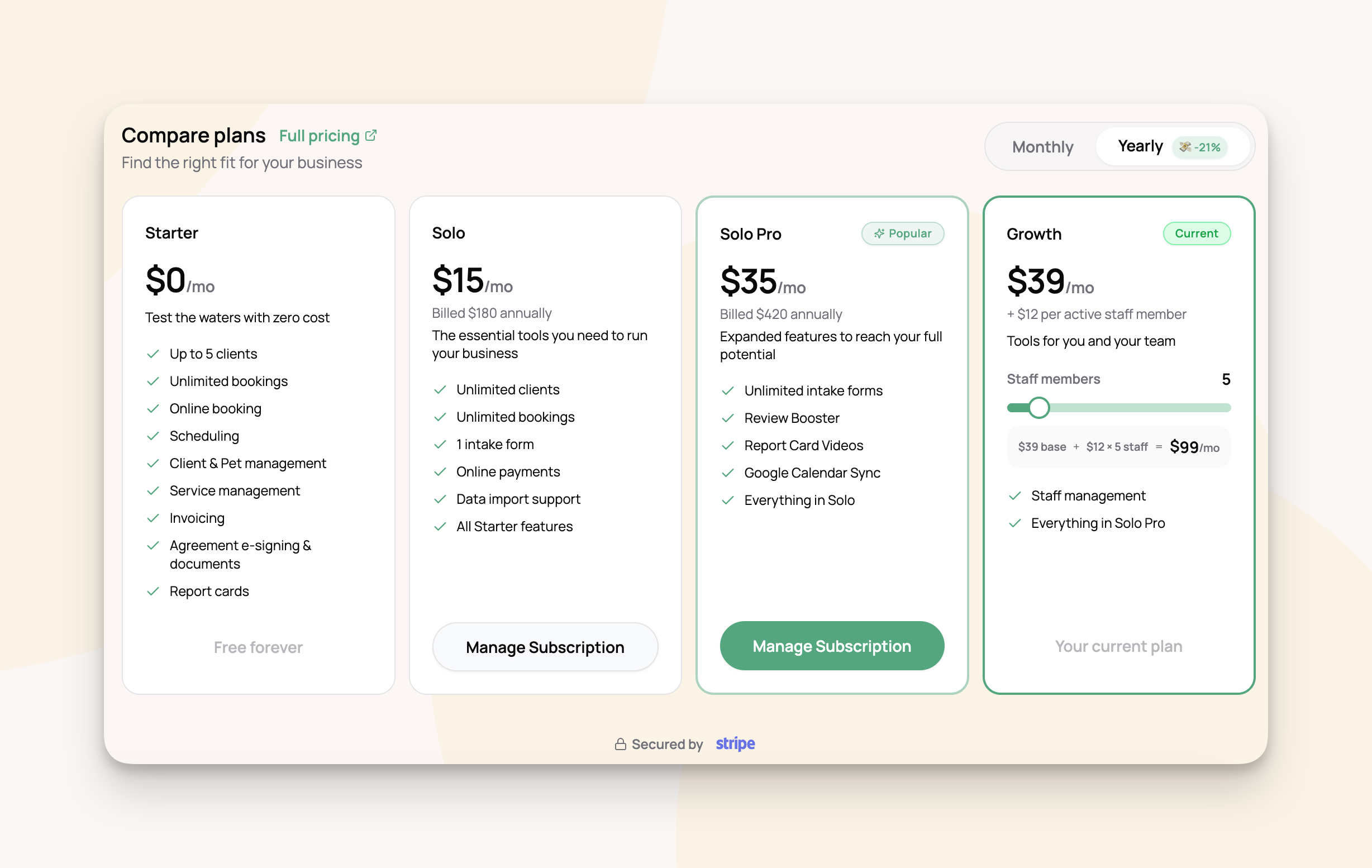
Scritches offers four plans designed to grow with your pet care business:
Annual billing is available at a discount on Solo and Solo Pro plans. The Growth plan is billed monthly. You can view and manage your plan from Settings → Billing.
What's Included in the Growth Plan
The Growth plan includes everything in Solo Pro, plus the tools you need to manage a team:
Everything in Solo Pro:
Unlimited clients and bookings
Unlimited intake forms
Online booking and payments
Google Calendar sync
Review Booster
Report card videos
Agreement e-signing and documents
Plus team features:
Staff management — Add team members, assign roles, and control what each person can access
Staff scheduling — Assign staff to bookings and see everyone's schedule from one calendar
Compensation tracking & payroll reports — Set pay rates and generate earnings reports for any date range
"Meet Our Team" — Showcase your team with photos and bios on your online booking page
Daily schedule reminders — Automatically email each team member their schedule for the next day
How Active Staff Members Are Calculated
The Growth plan costs $39 per month for your account, plus $12 per active staff member. At the end of each billing period, we calculate the number of active staff members your business had and charge accordingly.
Here's how we determine who counts as an active staff member:
The business owner is never counted. You always have access to all features at the base price.
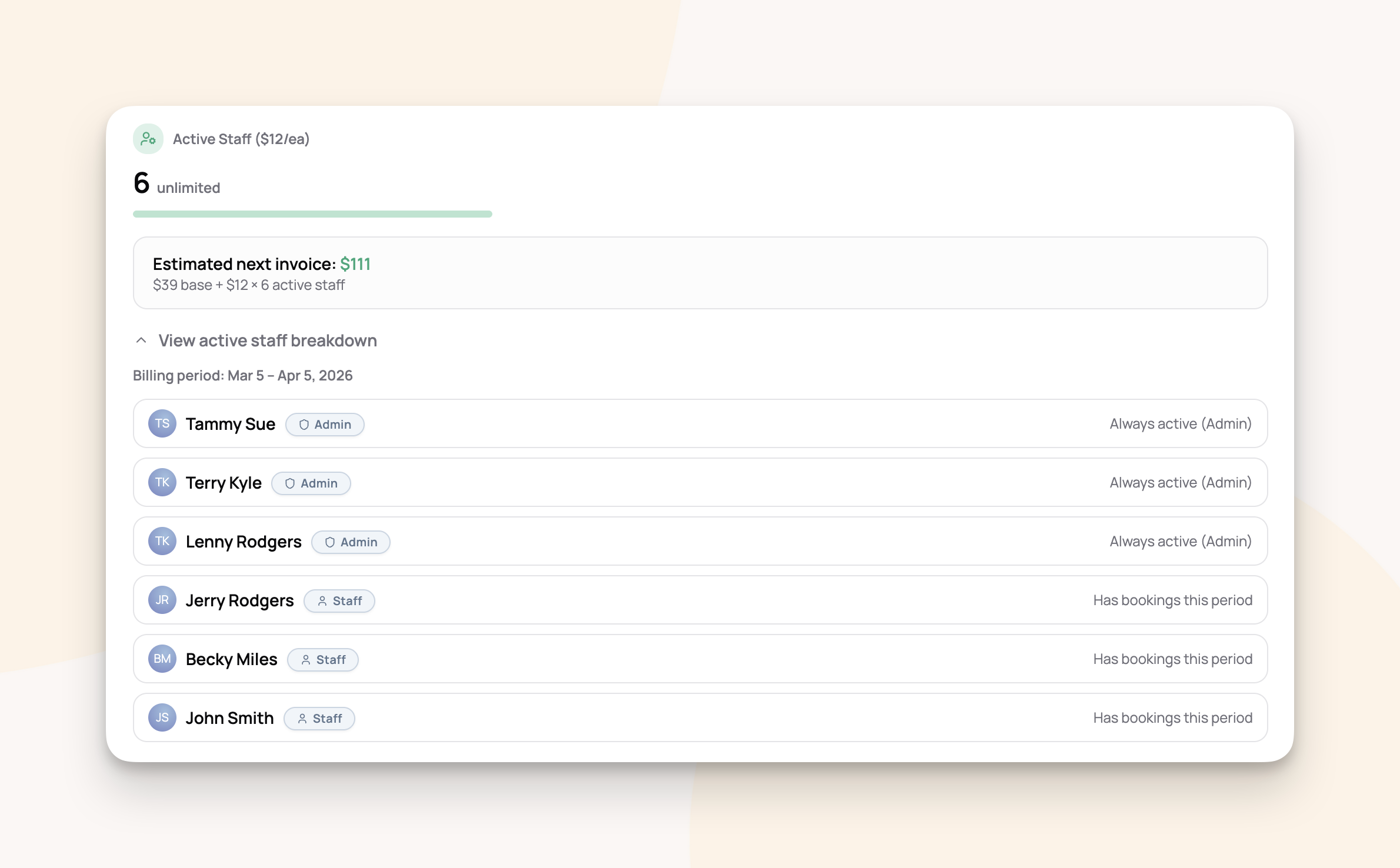
Administrators are always counted as active staff members, regardless of whether they have booking assignments. Their role in managing your business means they are always using the platform.
Staff and Senior Staff are counted if they were assigned to at least one booking during the billing period. If a team member had no booking assignments that period, they are not billed.
You do not need to remove team members from the system to avoid charges. If a staff member has no booking assignments in a given period, they simply won't appear on your bill.
Billing Example
Let's say Happy Tails Pet Care subscribes to the Growth plan on March 15th. Their team is:
Happy Tails' bill for this period:
Lisa was not charged because she had no booking assignments during the billing period. There's no need to archive or remove her to avoid charges.
If Lisa picks up shifts next month and gets assigned to bookings, she'll appear on that month's bill. If Mike takes a month off and you temporarily archive his profile, he won't be counted for that period.
Managing Your Subscription
You can manage your plan from Settings → Billing:
View your current plan and subscription status (Active, Trial, Canceling)
See your usage — active clients, bookings this month, intake forms, and active staff count
View your active staff breakdown — on the Growth plan, expand the breakdown to see exactly which team members are being billed and why, along with your current billing period dates
See your estimated next invoice — the billing page shows a real-time estimate based on your current active staff count
Switch plans — upgrade or downgrade at any time
Manage payment methods and view billing history — click "Manage Billing" to access your full billing portal
Upgrading to Growth
If you're currently on Solo Pro and add a staff member, you'll be prompted to upgrade to the Growth plan. You can upgrade at any time from Settings → Billing.
When you upgrade:
Your new plan takes effect immediately
You get access to all team features right away
Your billing period resets and you'll be charged the Growth base rate. The active staff member usage will be charged at the end of your billing period.
Free trial
If you'd like to try the Growth plan before committing, a 14-day free trial is available. Look for the "Or try free for 14 days" option below the upgrade button on the billing page or the upgrade prompt.
During the trial:
You get full access to all Growth plan features, including staff management
Your payment method is collected upfront but you won't be charged until the trial ends
Active staff usage is tracked during the trial so you can get a sense of pricing
Your billing page will show a "Trial" badge with a countdown of days remaining
The free trial is available once per business. If your trial ends and you'd like more time, reach out to support (support@scritches.io)
Canceling or Downgrading
You can cancel or switch plans at any time from "Manage Billing" on your billing page.
What happens when you cancel
When you cancel your plan, it doesn't end right away. You'll keep full access to all features until the end of your current billing period. Your billing page will show a "Canceling" status with the exact date your plan ends.
At the end of the billing period, you'll be charged for any active staff usage during that final period, and your account will revert to the free Starter plan.
You can resubscribe at any time from Manage Billing if you change your mind before the period ends.
Downgrading from Growth
If you switch from Growth to Solo Pro or another plan:
You'll lose access to staff management features at the end of your current billing period
Your staff data (profiles, compensation rates, pay history) is preserved — if you upgrade again later, everything will be there
Existing staff members will no longer have app access
Frequently Asked Questions
Do I need to remove staff members to avoid charges? No. Only staff with booking assignments (and administrators) are counted as active. Team members with no assignments in a billing period are not charged.
What if I only need staff some months? You're only billed for active staff each period. In a quiet month where only you handle bookings, you'd pay just the $39 base rate. In a busy month with three active staff, you'd pay $39 + $36 = $75.
Is there a limit to how many staff I can add? No. Add as many team members as you need. You're only billed for those who are active.
Can I try the Growth plan before committing? Yes. A 14-day free trial is available the first time you upgrade to the Growth plan. You'll have full access to all team features during the trial and won't be charged until it ends.
Is there a contract? No. Scritches is month-to-month with no contracts. You can cancel at any time from Settings → Billing.
What happens if I cancel mid-month? You'll keep access to all features until the end of your current billing period. At that point, you'll be charged for any active staff usage during the final period, and your account will revert to the free Starter plan.
Where can I view my past payments? Go to Settings → Billing and click "Manage Billing" to view your full billing and payment history.
Can I switch between monthly and annual billing? Annual billing is available on Solo and Solo Pro plans. The Growth plan is billed monthly because staff usage varies from month to month.
Need help with something else? Check out our other guides:
Was this helpful?
Still need help? Ask the team