Discounts
Hey Lucas, I plan to give discounts for various reasons(i.e. on a pet’s birthday I will send a digital birthday card with a discount code they can use next time they book). So Im trying to figure out how i can do that using Scritches.
Applying the actually discount manually is already sorted out. So that leaves the issue of how does the client turn in or “present” the code or coupon. I could instruct them to contact me before they plan to book to alert me but that is far from convenient for either of us and doesn’t accomplish offering a modern, seamless, stress free customer experience.
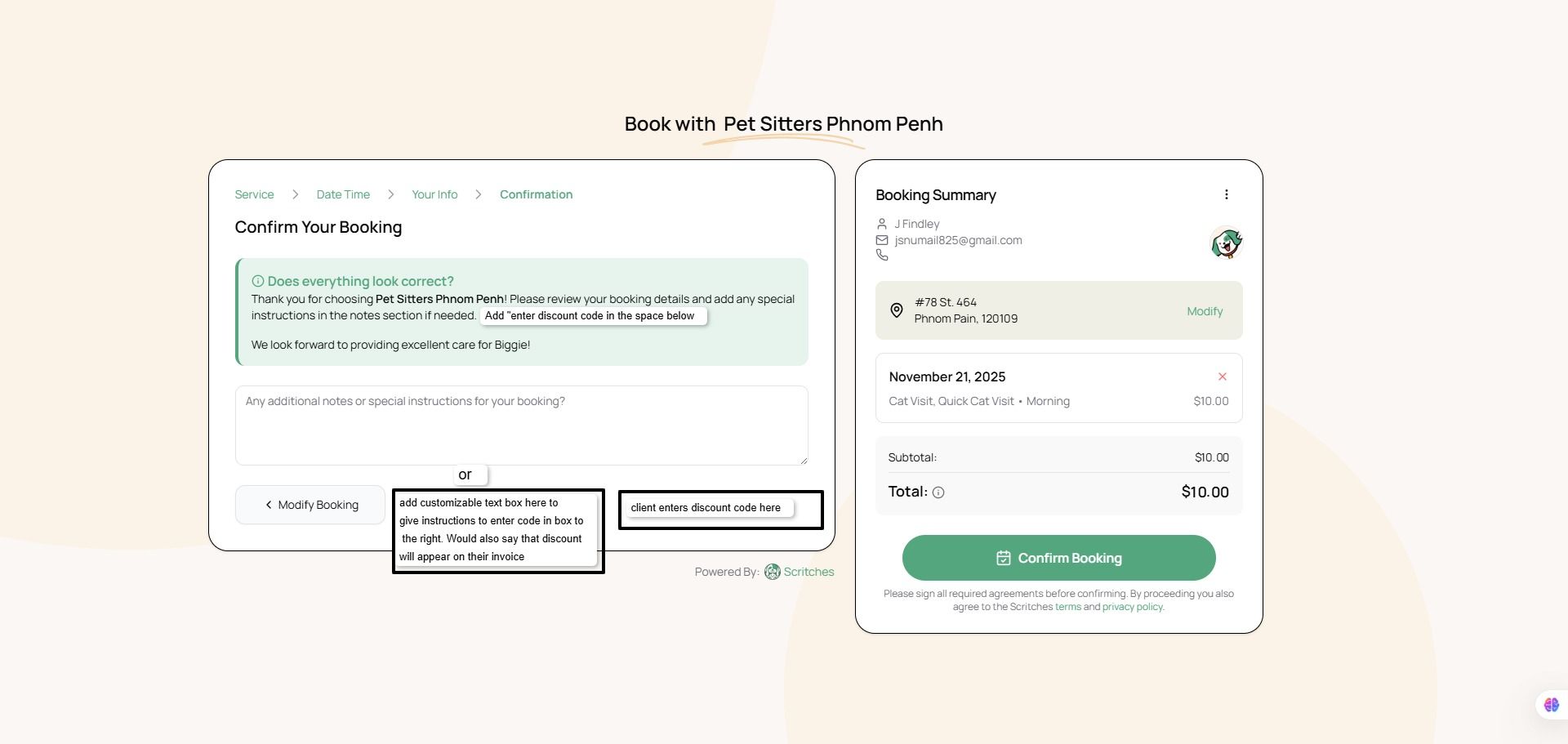
Maybe you have a workaround or suggestion for this? If not, the simplest solution I can come up with is to rewquest that you add for 2 text boxes to the checkout page.
The first text box box would would be for the user to enter customized text that instructs their client to enter their discount code in the 2nd box lets their client know that the discounted fee will appear on their invoice so they don’t expect the amount they see on their screen to change.
The second box is where the discount code would be entered and it would need to appear in the booking information that the Scritches user receives. Then the user who obviously has to keep track of our own codes would apply the discount manually and send the invoice.
I’ll attach a screenshot to show what I mean. To be clear the request is a way for clients to turn in a coupon or discount code when they are booking not before or after, even if it can’t actually be applied at that time.
This request was merged into another request
Comments6
Kerr L
Feb 19
Just wanted to add how I use discounts:
I have a special for all my new clients. For the next year they are getting a percentage off all services and no surcharges.
I also have a multibook discount and plan to run other marketing promos later.
In my old CRM, I was able to tag the account as having this discount and it would auto apply during invoice creation.
Since I can’t do this automatically in Scritches, I have to manually do it.
Determine who gets the discount, manually create the invoices after services, and then add the discount at the bottom of every invoice that client receives
Jackson PSPP
Feb 26
Hey @tribetails thanks for sharing. A large scale discount works really well in this situation. Of course identifying who gets the discount, entering the discount,etc isn’t ideal, but at least it solves my main concern, which is , how does a client tell me they want to redeem a discount. I just can’t ask them to email me in 2026. Applying a discount for a period of time means no one has to redeem, they just receive it automatically, thats a good idea, thanks.
Lucas Steflor
Nov 19, 2025
Hey @PSPP Findley , this all makes sense. I do want to avoid building one-off fields for individual workflows, but I think a generalized version of what you described could cover this. Something like a “Final Note” section. Basically, what’s there already, but with the addition of customizable explainer text.
Jackson PSPP
Dec 7, 2025
Hey Lucas, I just wanted to say that even though my request focused on how I’d personally use this, I really do think a version of this feature, basically what you described, would help any of your users who have or will use the discount feature when creating an invoice. Of course I dont know how anyone else operates, but Im thinking that usually a discount only gets applied because a client asks for it, whether it came from a promo, a correction, a friend/family discount, or anything else.
So the booking screen seems like the most logical and easiest place for clients to ask for their discount—whether it’s a code or just a quick note. It’s easier for them, and it’s easier for us bc if the reminder is attached to the booking itself, we’re far less likely to forget. But if clients sends it by email or messages ahead of time, it’s easy for a sitter to forget to apply it or miss the email or something like that.
Lucas Steflor
Dec 11, 2025
Hey @PSPP KH , I agree! I can add this to the roadmap.
Jackson PSPP
Dec 11, 2025
I am so happy to read this! Thank you.