Choosing Who Can Book Online
Let anyone book, make new clients start with a meet and greet, or take bookings only from clients you already have.
Written By Lucas Steflor
Last updated 13 days ago
Your booking link is on Instagram, and strangers are booking overnight stays for dogs you've never met. You'd rather meet every new dog first, or only take bookings from your regulars. One setting decides who can book online.
The three options
Open New clients and pick one under A pet parent finds your page.
Whichever you choose, everyone can still see your services and prices on your booking page. The option only changes who can finish a booking.
Intro visit first
When you choose it, pick your intro services under Services new clients can book. Your Meet & Greet is already picked.
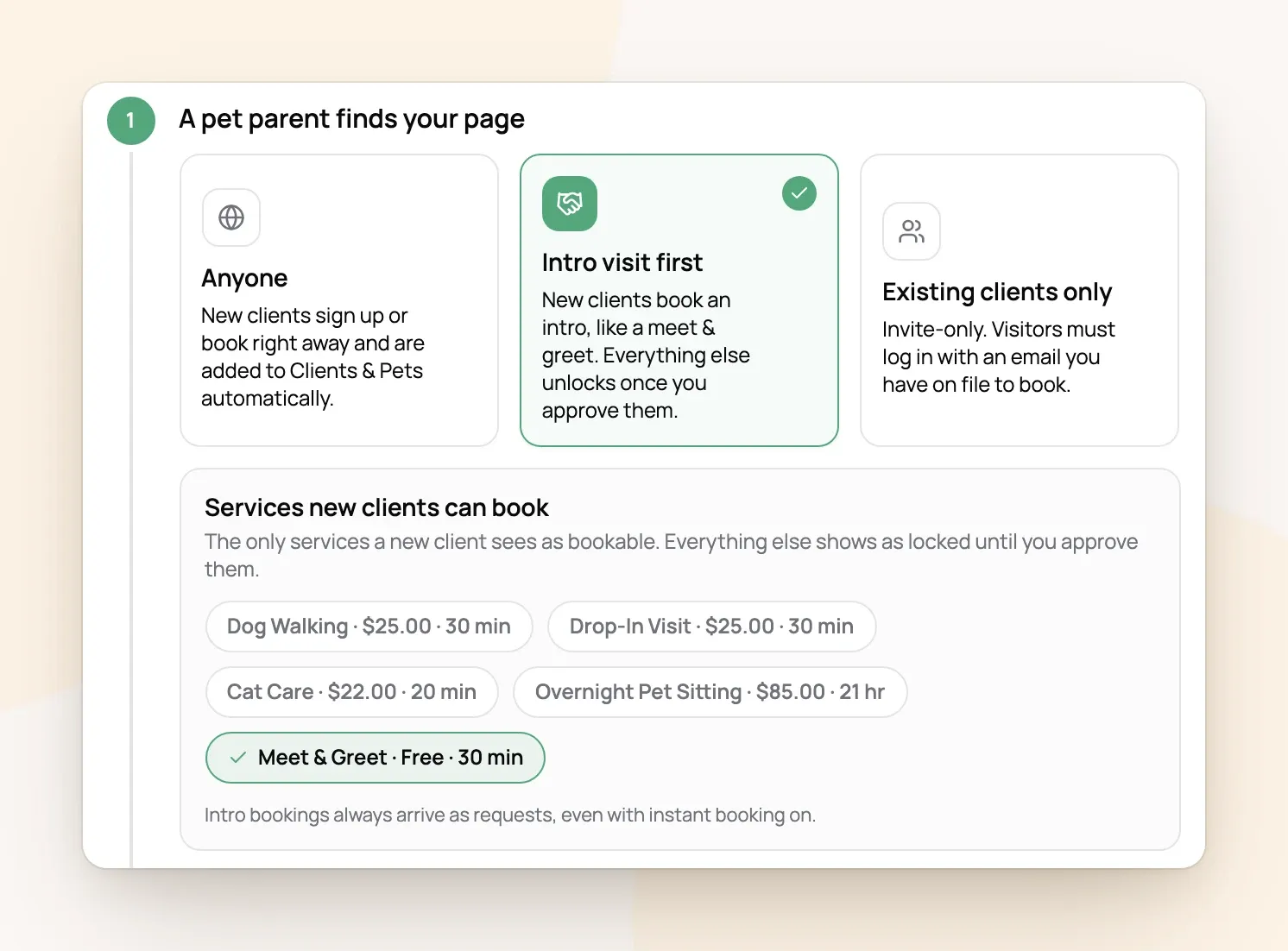
Here's how it plays out:
-
A new client opens your booking page. Every service except your intro is locked, with a note that you start every new pet parent with a Meet & Greet.
-
They book the Meet & Greet. It always arrives as a request, even if you use instant book, and they can tell you what care they're looking for.
-
After the visit, they show up under New clients to approve in Requests. Choose Open full booking to unlock all your services for them, or Not yet.
For example: Lauren Davis books a free Meet & Greet for her labradoodle Hazel on Saturday. Jess meets them, likes them, and chooses Open full booking. Lauren can now book walks like any other client.
You can also approve a client from their profile: choose the New client · intro only chip under their name, then Open full booking. If you leave Services new clients can book empty, new clients can sign up but can't book anything until you approve them, which suits businesses that vet everyone by phone.
Existing clients only
Anyone who isn't already your client sees "Online booking is for existing clients" and is asked to get in touch with you. Clients you've added yourself or imported can book; they log in with the email you have on file and a code sent to it.
Your regular clients need to log in
With Intro visit first or Existing clients only, Scritches recognizes your clients by the email they log in with. A regular who books without logging in is treated as a new client. Sending them a welcome email sets up their login (Adding Your Clients and Inviting Them to Their Portal).
Frequently Asked Questions
Can I stop just one client from booking online?
Can I stop just one client from booking online?
Yes. On their profile, choose the Online booking on chip under their name, then Turn off online booking. They'll see a note asking them to book with you directly.
Can I take back a client's full booking access?
Can I take back a client's full booking access?
Yes. On their profile, choose the Full booking chip under their name, then Limit to intro bookings.
Do clients I add myself need approval?
Do clients I add myself need approval?
No. Clients you add or import are approved automatically. Approval is only for people who sign up through your booking page.
What's the difference between this and request to book?
What's the difference between this and request to book?
This decides who can book. Request to book or instant book decides whether their booking needs your OK (Making Your Booking Page Yours).
Was this helpful?
Still need help? Ask the team